
Most of the sounds a hard drive makes are completely normal. A few of them mean the drive is failing right now, and those are the ones where turning it off quickly makes the biggest difference. This guide helps you tell the two apart, sound by sound, and tells you what to do once you know.
- Quiet humming, a whir at start-up and soft, irregular ticking are normal.
- A click followed by a whir, repeating over and over, means the drive can’t read its own data. Turn it off.
- Grinding or scraping means something inside is touching the platters. Turn it off now.
- Beeping or buzzing means the platters can’t spin. Turn it off and leave it off.
Normal hard drive sounds
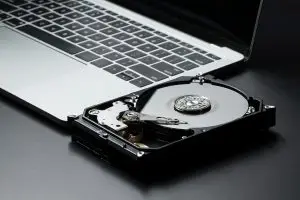
A traditional hard drive has spinning platters and a small arm that moves the read and write heads across them, so it’s never perfectly silent. These sounds are part of normal work:
- A steady, low hum. The platters spin at 5,400 or 7,200 revolutions per minute the whole time the drive is on.
- A rising whir for a second or two at start-up, and a falling one when the drive spins down.
- Soft, uneven ticking or chattering while files open, save or copy. That’s the head arm moving, and it gets busier during big copies or a virus scan.
- A single click every so often while the computer is idle. Many drives park their heads to save power, especially in laptops and external drives.
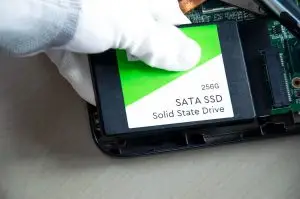
If your computer uses a solid state drive (SSD), the drive itself makes no noise at all. Any sound you hear is a fan or the power supply.
Failing hard drive sounds and what they mean
| What you hear | What is usually happening | What to do |
|---|---|---|
| Click, then a whir, repeating every few seconds | The heads can’t read the drive’s own setup information, so it keeps trying. Often a head failure, sometimes firmware. | Turn it off. Every cycle can wear the heads further. |
| Grinding, scraping or a rough rasping sound | A head is touching the platter surface and scraping off the magnetic coating, which is where your data lives. | Turn it off immediately. This is the one sound where seconds matter. |
| Beeping or a short buzz, and the drive never spins up | The motor is trying and failing to turn the platters. Heads stuck to the surface or a seized bearing are the usual causes. | Turn it off. Repeated attempts can damage the motor and the heads. |
| A high whine that has gotten louder over time | Wear in the spindle bearing. The drive may keep working for a while, but it’s on borrowed time. | Copy your important files off it today while it still reads. |
| Normal sounds, but the drive is very slow or keeps freezing | Weak or bad sectors. The drive keeps re-reading the same areas. | Stop using it and don’t run repair tools. Back up what you can or get it imaged. |
| Complete silence and no spin-up | Often a failed circuit board or a power problem rather than the inside of the drive. | Check the cable and power once. If it’s still silent, leave it off. |
If the sound is clicking, our guide to hard drive failure symptoms goes further into each failure, with what is safe to try at home and what isn’t.
Is it really the hard drive?
Before you assume the worst, check where the sound is coming from. In a desktop, fans and the power supply make most of the noise, and a dusty fan can grind or rattle in a way that sounds alarming. Put your ear near the drive bay, or open the case and listen. With an external drive, unplug it while the computer stays on. If the sound stops, it was the drive.
What to do when your hard drive is making noise
- Save anything that’s open, then shut down. Don’t leave a clicking or grinding drive running while you search for answers.
- Don’t keep restarting it to see if it comes back. Each start-up is another attempt by damaged parts, and many drives that could have been saved are lost this way.
- Skip recovery software and disk repair tools. They make a mechanically failing drive work harder for hours. Our guide on when DIY recovery makes sense explains where the line is.
- Don’t open the drive, tap it or put it in the freezer. The inside of a drive needs a cleanroom, and a single speck of dust can scratch the platters.
- For an external drive, try one different USB cable or port once, because a weak connection can cause clicking and buzzing on portable drives. If the noise continues, stop. Our guide to an external hard drive that stops working covers the rest.
Grinding means a head is scraping the platter. Each minute the drive runs destroys more of the surface, and whatever is scraped off is gone for good. Unplug it now, even in the middle of a copy.
Can the data be recovered?
Very often, yes. A drive that has been turned off quickly after it started clicking, beeping or buzzing usually still has its data intact on the platters. Recovering it means replacing or freeing the heads in a cleanroom, then copying the drive one sector at a time on equipment that tolerates damaged areas. That work happens in our own lab in Langley, BC. You can drop a drive off in downtown Vancouver, Burnaby or at our Langley head office, or ship it free from anywhere in Canada.
Every drive gets a free evaluation within 48 hours, and you get a firm quote before any work starts. If we can’t recover your data, you don’t pay. Not sure how serious your drive’s sound is? Our free online drive check asks a few questions and gives you an idea of the likely cause and cost.
Frequently asked questions
Do hard drives make noise when they work normally?
Yes. A spinning hard drive hums quietly while it runs, whirs for a second or two when it spins up, and makes soft, irregular ticks while it reads and writes. Some drives also give a single click now and then when they park their heads to save power. None of that is a problem. Solid state drives have no moving parts, so they make no sound at all.
What does a failing hard drive sound like?
The sounds that point to trouble are repetitive and rhythmic: a click followed by a whir, over and over; a grinding or scraping sound; a beep or buzz while the drive fails to spin up; or a whine that has gotten louder over weeks. A drive that used to be quiet and now has a new, steady pattern of noise is worth taking seriously.
My hard drive is buzzing or beeping. What does that mean?
Usually the motor is trying to spin the platters and can’t. The two common causes are heads stuck to the platter surface, which happens after a knock or a long time unused, and a seized motor bearing. On small portable drives, a weak USB port can cause the same buzz. Try one different cable or port once. If it still buzzes, unplug it and leave it off.
Can I fix a clicking or grinding hard drive myself?
No. Both sounds come from inside the sealed drive, where the heads fly over the platters at a gap far thinner than a human hair, so a single speck of dust does damage. Software can’t help a drive with a mechanical fault, and every hour it runs makes the damage worse. Unplug it and get it looked at.
Will putting a hard drive in the freezer stop the clicking?
Please don’t. That trick dates from drives made decades ago. In a modern drive, condensation forms on the platters as it warms up, and that moisture can turn a recoverable head failure into scratched platters.
How much does it cost to recover a hard drive that’s making noise?
It depends on what is actually wrong, which is why the evaluation comes first. We examine the drive within 48 hours and send a firm written quote before any work starts. If we can’t recover your data, there is no fee.
Is your hard drive clicking, grinding or beeping?
Turn it off and leave it off. Book a drop-off or check your drive online first. The evaluation is free, and there is no fee if we can’t recover your data.
Book a Drop-OffCheck My Drive OnlineHard Drive Data Recovery