Every comparison of hard drives and SSDs tells you the SSD is faster and the hard drive is cheaper, and both are true. What those articles skip is what we see every day: how each one fails, how much warning you get, and what it takes to get the data back. That changes which drive belongs in which job. Here is the comparison from the lab’s side.
How each one works, in one paragraph each
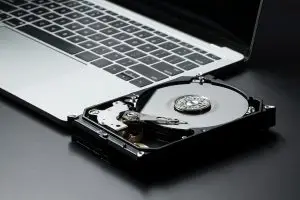
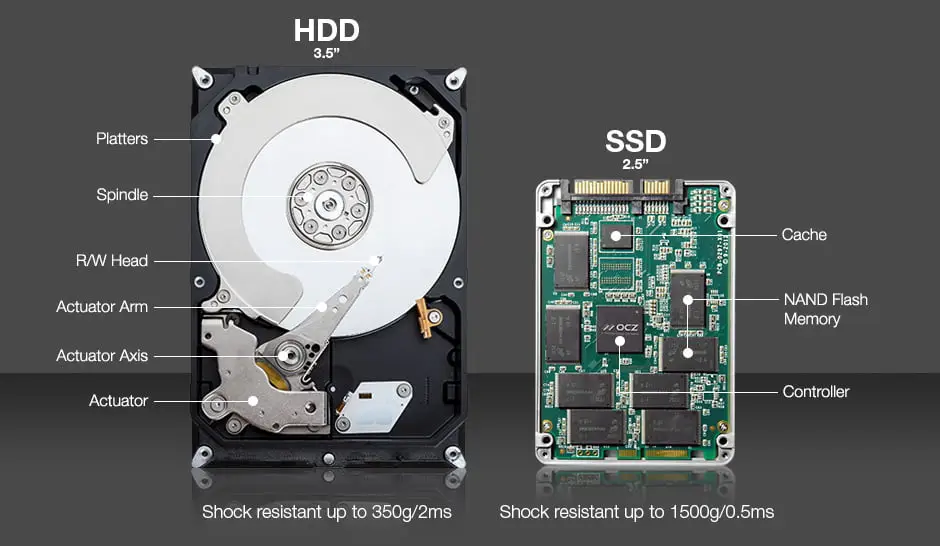
A hard disk drive stores data magnetically on spinning glass or aluminium platters. A stack of read/write heads flies a few nanometres above the surface on an arm that swings across the disk. It is a precision mechanical instrument, which is why it can be damaged by drops, why it makes sounds, and why it wears.
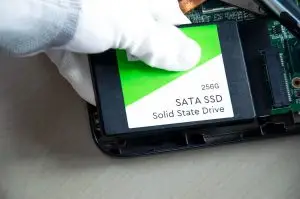
A solid state drive stores data as electrical charge trapped in billions of memory cells, managed by a controller chip running its own firmware. Nothing moves. It is fast, silent, and shock-proof, and it fails in a way that gives you almost no warning.
The comparison that matters
| Hard drive (HDD) | Solid state drive (SSD) | |
|---|---|---|
| Speed | Slow to seek, fine for large sequential files | Many times faster, especially for small files and boot |
| Cost per terabyte | Much lower, and the gap grows with capacity | Higher, and rising in 2026 as memory demand grows |
| Capacity available | Up to 20 TB and beyond in one drive | Typically 1 to 4 TB for consumer drives |
| Shock and drops | Vulnerable, especially while running | Largely immune |
| Noise and heat | Audible, warm | Silent, cool |
| How it fails | Gradually: bad sectors, slowdowns, sounds | Suddenly: controller or firmware, often no warning |
| Warning before failure | Usually days to weeks | Often none |
| Data left unpowered | Stable for many years | Leaks slowly; worse when worn or warm |
| Recovery after failure | High odds; cleanroom and board repair are routine | Good odds but harder; firmware and chip-level work, encryption can block |
| Recovery of deleted files | Usually possible until overwritten | Usually gone within hours because of TRIM |
How hard drives fail
Hard drives fail mechanically or electronically, and they almost always tell you first. Reads slow down as sectors go bad. A weak head makes the drive freeze and disappear. A failing head clicks. A seized motor hums. Each of those is a separate failure with its own recovery route and its own odds, which we lay out in our hard drive failure symptoms guide. The important thing for this comparison is that the data on the platters is almost always intact, and the recovery is about rebuilding the path to it.
How SSDs fail
SSDs fail in the controller, the firmware, or the power circuit far more often than in the memory itself. The drive works normally, then after a restart it is not detected, or reports a wrong size, or locks into read-only mode. The warning signs exist but are subtle, and we list them in our guide to the signs your SSD is failing. Recovery means repairing the firmware, replacing the failed part so the drive can be read once, or removing the memory chips and reading them directly. Drives that encrypt themselves in hardware add a key that has to be recovered along with the data.
There is one more difference that surprises people. Delete a file on a hard drive and it sits there until something overwrites it. Delete a file on an SSD and a feature called TRIM erases it in the background within hours. Our guide to deleted data recovery on SSDs explains why, and when it can still be recovered.
Which one for which job
| Use | Choose | Why |
|---|---|---|
| Operating system, applications, games | SSD | Speed is the whole point, and the data is replaceable |
| Current work files | SSD, backed up daily | Fast, but sudden failure means the backup must be current |
| Photo and video archive | Hard drive, two copies | Cheap capacity, stable when unpowered, recoverable |
| Backups | Hard drive, or a cloud service | Capacity per dollar, and a backup that sits idle should be on media that holds charge |
| NAS and home server | Hard drives rated for NAS | Capacity, and mechanical failures in an array are the recoverable kind |
| Laptop you carry everywhere | SSD | Drops kill hard drives |
| External drive for a project | Either, with a second copy | The drive type matters less than having two of them |
The lab’s advice on choosing
- Buy the SSD for speed and the hard drive for keeping. Most people need both.
- Treat every SSD as a drive that can vanish tonight. Back it up on a schedule, not when you remember.
- Do not archive on a single drive of either kind. Two copies, different media, one of them off site or in the cloud.
- Watch the warning signs. A slowing hard drive or a stuttering SSD is telling you to copy the data today, while it is easy.
Frequently asked questions
Which is more reliable, HDD or SSD?
Over a typical five year life, both fail at roughly similar low rates, but they fail differently. Hard drives usually degrade over weeks with warning signs and remain highly recoverable. SSDs usually fail suddenly, with no warning, and recovery depends on the controller and encryption. Reliable is the wrong word. Predictable is the difference, and hard drives are more predictable.
Is an SSD better than an HDD for storing photos long term?
For an archive that sits unpowered in a drawer, a hard drive is the safer choice. SSDs store data as electrical charge that slowly leaks, and a drive left unpowered for years, especially somewhere warm, can lose data. Either way, the real answer is two copies on different media, refreshed every couple of years.
Do SSDs lose data when unpowered?
Slowly, yes. A new SSD kept cool holds data for years unpowered. A worn SSD kept warm can lose data in months. Plugging it in periodically lets the controller refresh weak cells.
What is the difference between SSD and HDD in simple terms?
A hard drive stores data magnetically on spinning platters read by a moving arm. An SSD stores data as electrical charge in memory chips with no moving parts. The SSD is much faster and shock-proof. The hard drive is cheaper per terabyte and easier to recover when it fails.
Is data recovery harder on an SSD?
Usually, yes. A failed hard drive is a mechanical or electronic problem with the data intact on the platters, and cleanroom work recovers it in most cases. A failed SSD needs firmware repair or a chip-level read, and self-encrypting models add a key problem. Deleted files are the biggest gap: on a hard drive they usually persist, on an SSD the TRIM feature erases them within hours.
Should I get an HDD or SSD?
SSD for anything you run: the operating system, applications, games, current projects. Hard drive for anything you keep: backups, archives, media libraries, NAS storage. Most people are best served by both, and by remembering that neither one is a backup of the other.
Whichever drive it was, the data is probably recoverable
Hard drives, SSDs, and everything in between, recovered in our own BC cleanroom lab. Free evaluation, no data no fee.
Hard Drive RecoverySSD RecoveryContact Us